TDM Calculator Design System

TDM Calculator Design System

Client
LADOT & LA City Planning
Role
UX Designer
Timeline
September 2024 - May 2025
Status
Ongoing, as of June 2026
TDM Calculator Design System

TDM Calculator Design System

Client
LADOT & LA City Planning
Role
UX Designer
Timeline
September 2024 - May 2025
Status
Ongoing, as of June 2026
TDM Calculator Design System

TDM Calculator Design System

Client
LADOT & LA City Planning
Role
UX Designer
Timeline
September 2024 - May 2025
Status
Ongoing, as of June 2026

The TDM Calculator is a web app that helps real estate developers align with Los Angeles’ Mobility Plan 2035, from selecting transportation demand management strategies to submitting applications for city review.

Submissions page showing a table of developers' submitted applications, including project name, address, submission date, and approval status.
Above

The Submissions page, where developers could see their applications and track their status.

The Submissions page, where developers could see their applications and track their status.

Above

The Submissions page, where developers could see their applications and track their status.

When I joined this project, four months before launch, foundational design system work still had to be completed as the product reflected years of decisions made without shared standards. Without established foundations, components were built ad-hoc, resulting in inconsistencies across designs, the dev site, and how they were implemented.

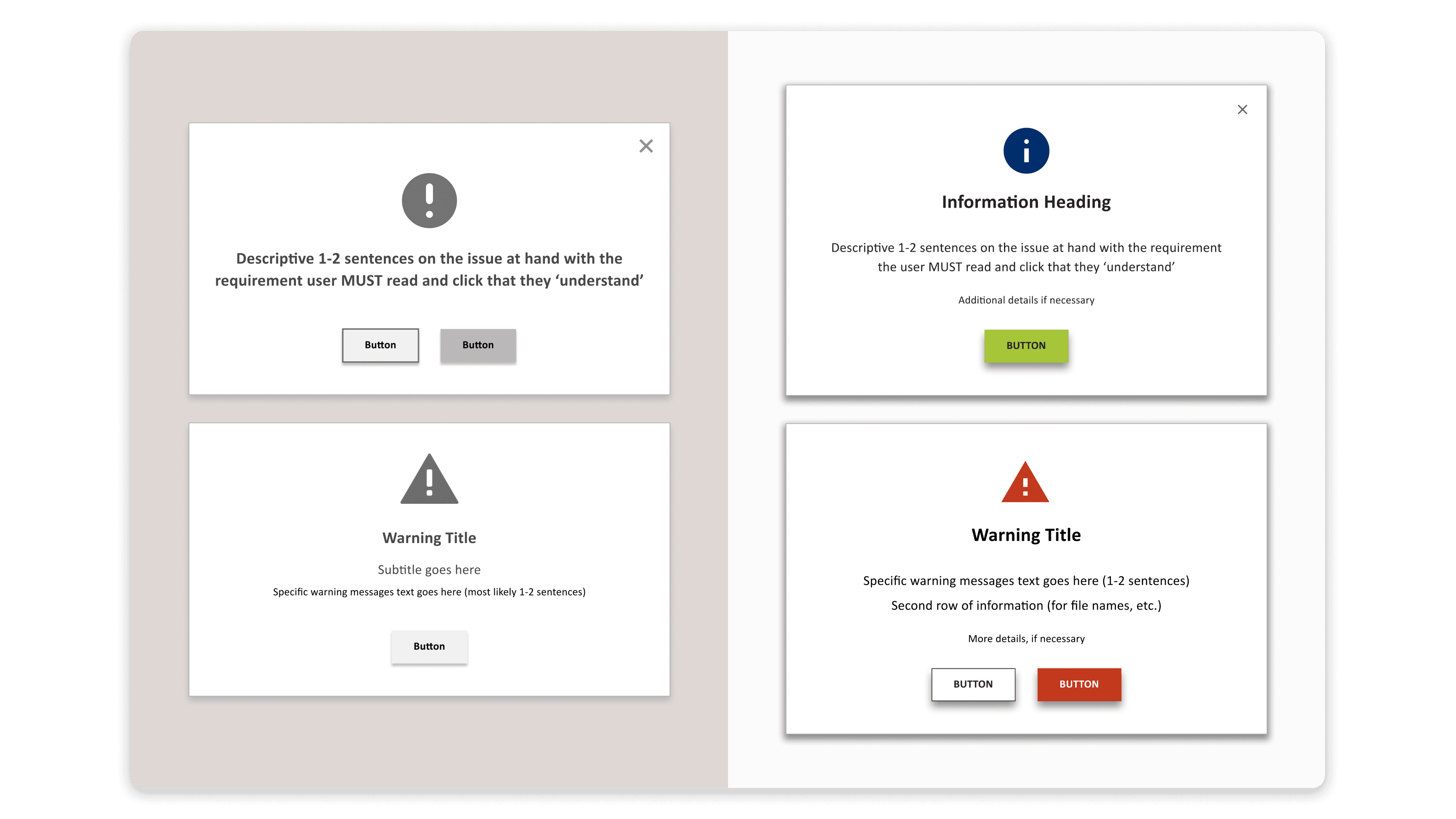
Standardizing Modals

The design system already had three types of modals based on the following use cases: to warn users, for completing actions, and for sharing important information. However, modals across the dev site had various style variations that were inconsistent with the design system.

Side-by-side comparison of the standardized warning modal against two dev-site modals that vary from it in layout and style.
Above

The design system had a warning modal, but inconsistent versions existed on the dev site.

The design system had a warning modal, but inconsistent versions existed on the dev site.

Above

The design system had a warning modal, but inconsistent versions existed on the dev site.

I updated the visual design of the modals and created content guidelines, keeping designs close to what already existed to save time. But I didn’t question whether the three categories were still applicable, and the modals had to be revisited months later to account for confirmatory actions.

Before-and-after of the warning, important information, and action modals, with the after versions showing consistent layout, icons, and buttons.
Above

While the modals became visually consistent, the original three categories carried over.

While the modals became visually consistent, the original three categories carried over.

Above

While the modals became visually consistent, the original three categories carried over.

Establishing Tooltips and Popovers

The design system had four tooltip types defined by appearance and placement rather than interaction pattern, making them difficult to apply broadly across the site.

To generalize these components, I researched the distinction between tooltips and popovers and audited every tooltip-like component in the dev site.
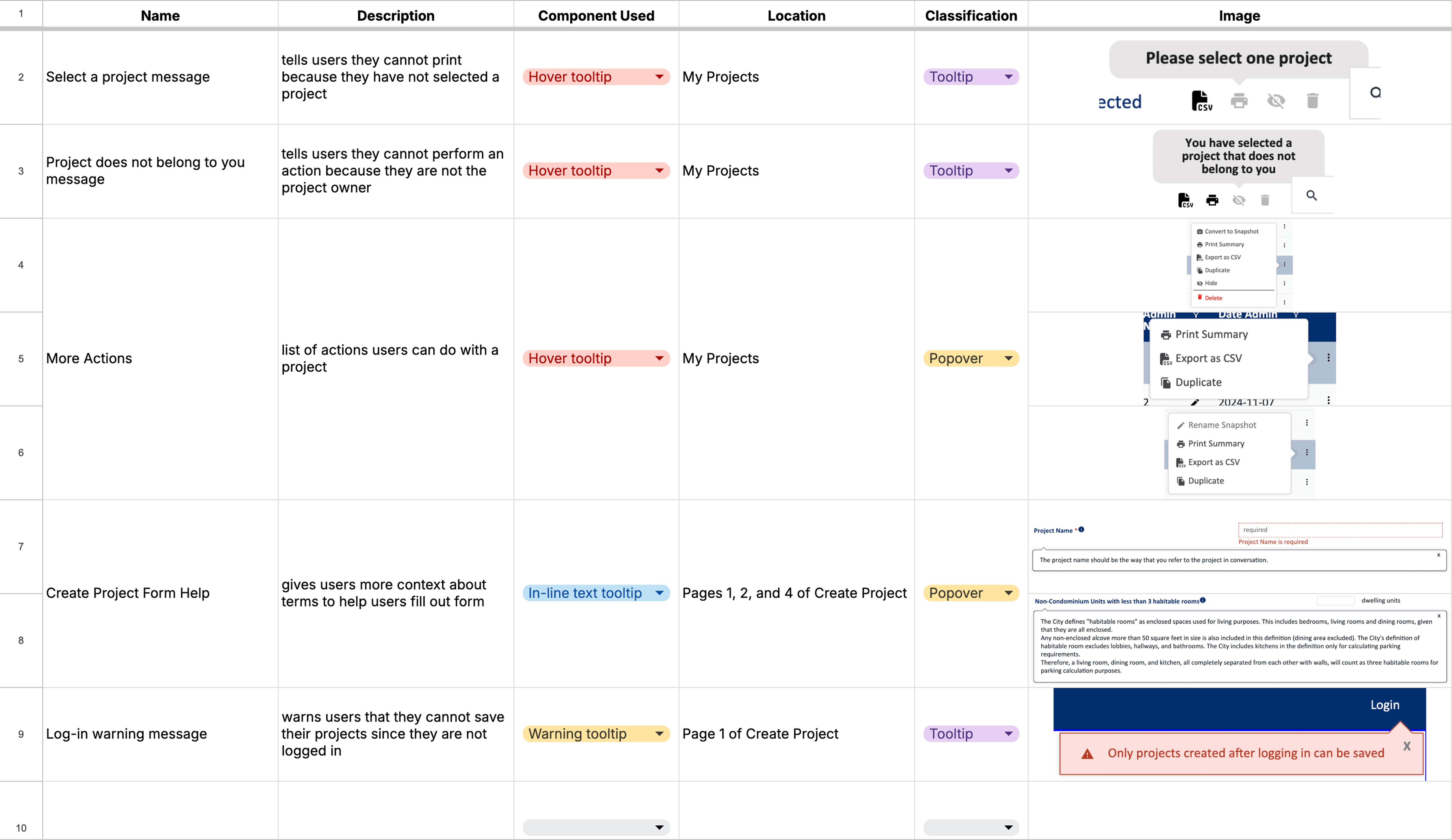
Audit spreadsheet listing tooltip-like components by name, description, component used, location, and classification as tooltip or popover, with screenshots of each.
Above

After auditing every tooltip-like component, I reclassified each as a tooltip or popover based on its contents.

After auditing every tooltip-like component, I reclassified each as a tooltip or popover based on its contents.

Above

After auditing every tooltip-like component, I reclassified each as a tooltip or popover based on its contents.

The audit also uncovered an accessibility and usability issue, which was determined to be out of scope.

Above

Because the icons only showed on hover, users had no way to know the tooltips existed.

Because the icons only showed on hover, users had no way to know the tooltips existed.

Above

Because the icons only showed on hover, users had no way to know the tooltips existed.

From the research and audit, I consolidated the four types into two generalized components with clear guidelines on use and content.
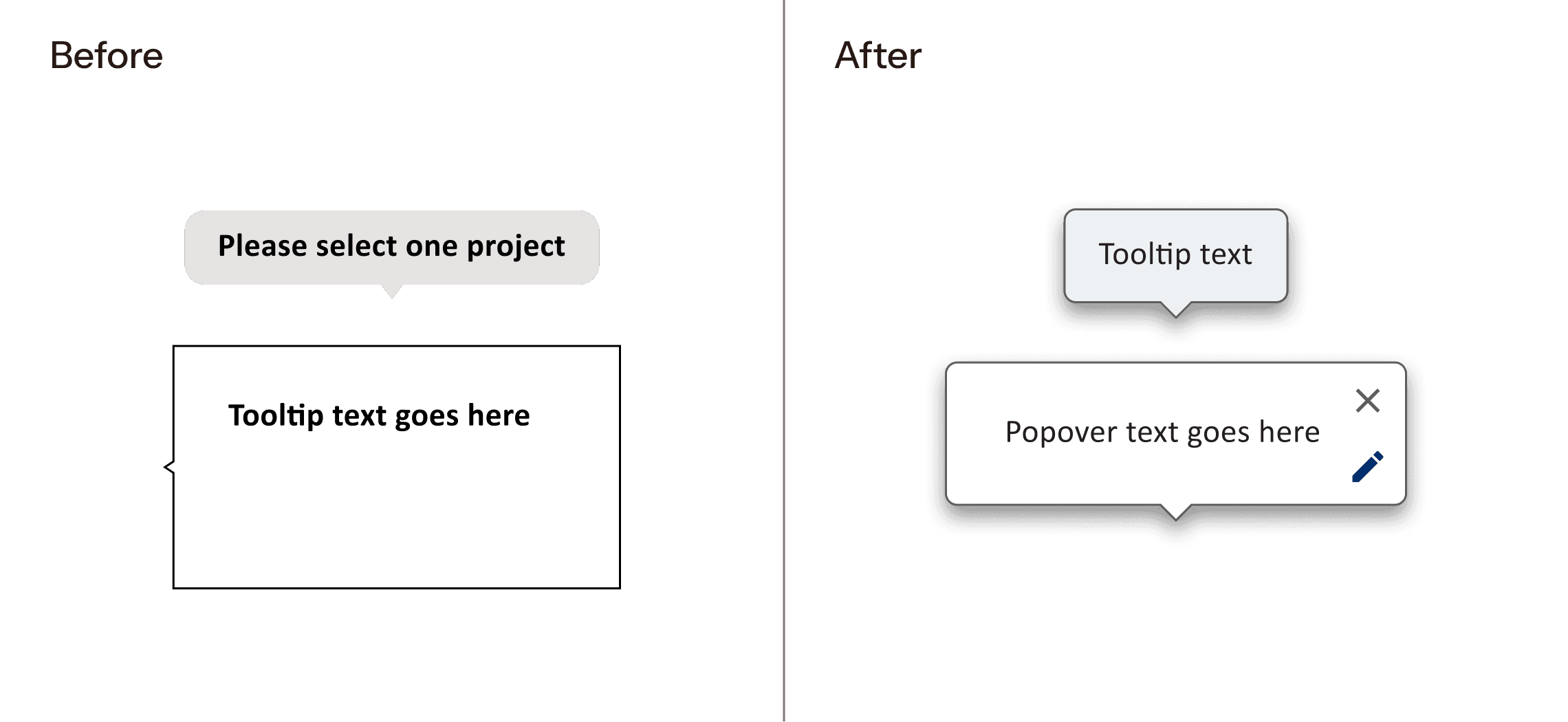
Before and after of the tooltip components, showing the original version on the left and the two new components on the right: a tooltip for short text and a popover for longer, interactive content.
Above

Two generalized components, tooltip and popover, replaced the four original variants.

Two generalized components, tooltip and popover, replaced the four original variants.

Above

Two generalized components, tooltip and popover, replaced the four original variants.

Reordering the Navigation

While working on the Submissions page, I noticed the order of the links didn’t reflect how users should move through the product. I updated the navigation to include newly added pages, such as the Submissions page, and reordered the links based on sequential priority for each user type: regular user, admin, and security admin.

Before-and-after of the navigation, showing the regular-user nav in its original order and the reordered navs for regular, admin, and security admin users.
Above

The navigation links were reordered to match how each user type moves through the product, with new pages like Submissions added.

The navigation links were reordered to match how each user type moves through the product, with new pages like Submissions added.

Above

The navigation links were reordered to match how each user type moves through the product, with new pages like Submissions added.

In addition, I updated the hover and active states of links for better readability and to align with existing interaction patterns in the product.

Before and after of link interaction states for primary and secondary links.
Above

Primary and secondary links were styled differently to establish visual hierarchy in the navigation.

Primary and secondary links were styled differently to establish visual hierarchy in the navigation.

Above

Primary and secondary links were styled differently to establish visual hierarchy in the navigation.

Outcomes

I audited the dev site for visual consistency and conducted a QA review after handoff, documenting design and implementation issues along the way. This work brought a more visually cohesive design and gave future contributors clearer guidelines to build from.

This project was completed through Hack for LA, a civic tech volunteer organization, in partnership with LADOT (Los Angeles Department of Transportation) and Los Angeles City Planning.

This project was completed through Hack for LA, a civic tech volunteer organization, in partnership with LADOT (Los Angeles Department of Transportation) and Los Angeles City Planning.